
Google Ads Promotion Asset: Practical Guide

A Promotion asset is another type of extension for your Responsive Search Ad or Performance Max asset group. This extension can become an excellent growth lever for your Google Ads campaigns by improving the user experience. Below we break down the key aspects of the Promotion extension.
Contents
- What is the Promotion asset
- How to add a Promotion asset
- How to configure the Promotion asset
- Holiday-specific vs. Everyday discounts
- Promotion Type options
- Naming, landing pages, and additional settings
- Where the asset can appear
- How to track performance
What is the Promotion asset
The Promotion asset is a flexible ad extension in Google Ads designed to highlight time-bound or always-on offers, improving ad relevance and CTR while guiding users to promotional landing pages.
How to add a Promotion asset
- When creating a new Responsive Search Ad or a Performance Max asset group, select
More asset types. - Click
Promotions. - Choose
Add Promotion. - Configure all aspects of the asset and click
Apply.
How to configure the Promotion asset
A Promotion asset is one of the most flexible elements of your ad. You can configure it precisely for your promotion using a wide range of settings.
Holiday-specific vs. Everyday discounts
You can tie your promotion to a specific occasion or run it as an everyday discount (no occasion selected).
Supported occasions
- Back to School
- Black Friday
- Chinese New Year
- Christmas
- Cyber Monday
- Diwali
- Fall Sale
- Father’s Day
- Halloween
- Hanukkah
- Independence Day
- Mother’s Day
- National Day
- New Year’s
- Parents’ Day
- Passover
- Ramadan
- St. Nicholas Day
- Summer Sale
- Valentine’s Day
- Winter Sale
- Women’s Day
If you select an Occasion, you must set the start and end dates of your promotion (subject to Google Ads limits). If you leave the Occasion unspecified, you can implement an everyday discount strategy.
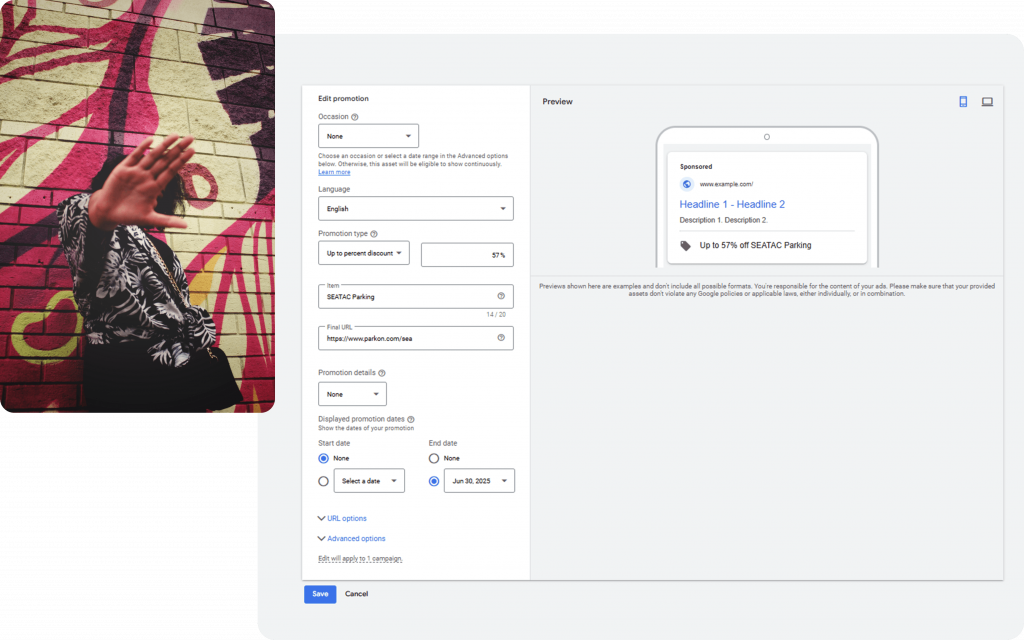
Promotion Type options
Monetary Discount
Specify the exact savings in your selected currency. Suitable for services or a mono-product offer with a fixed monetary discount.
Percent Discount
Create a landing page featuring products with the same percentage off and attach the extension to that page. Specify the percent discount.
Up to Monetary Discount
Specify a maximum monetary discount without guaranteeing that amount for every product.
Up to Percent Discount
The most flexible option—communicate a maximum percentage in an “Up to” format.
Naming, landing pages, and additional settings
- Promotion name in ad: This is the label users will see. For example, if you choose Up to Percent Discount at 30% and name your promotion “Engagement Rings,” the ad will display: “Up to 30% off Engagement Rings.”
- Dedicated landing pages: Build specific pages for the asset to route traffic more precisely and avoid showing discounts to uninterested users.
- Eligibility conditions: Add requirements such as a minimum order value or a promo code.
- Dates & schedule: Set visible start/end dates and the actual ad serving schedule.
- UTM parameters: Assign unique UTM tags when needed.
Where the asset can appear
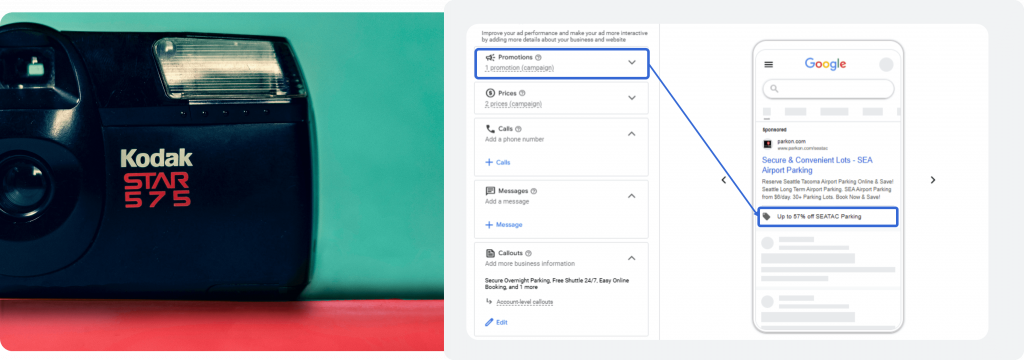
- Mobile and desktop search with Responsive Search Ads.
- Within Performance Max and other text+image formats, including short formats on YouTube and on Google Maps.
How to track performance
- Your Promotion asset will not show in 100% of impressions. Compare average ad performance to impressions where the Promotion was shown.
- In the left-hand navigation of Google Ads, open the Assets report and filter by Promotion. Within a specific campaign, review the asset’s performance for that campaign’s ads.